Tuesday, February 14, 2017

File Frequency

//program that displays number of characters,lines,words in a text file.
import java.lang.*;
import java.util.*;
import java.io.*;
class FileCount
{
 public static int words=0;
public static int lines=0;
public static int chars=0;
public static void wc(InputStreamReader isr)throws IOException
{
int c=0;
while((c=isr.read())!=-1)
{
chars++;
if(c=='\n')
lines++;
if(c=='\t' || c==' ' || c=='\n')
++words;

}
       }
                public static void main(String args[])
                {
                                String fname=" ";
                                System.out.println("enter a file name:");
                                try
                                {
                                       DataInputStream dis=new DataInputStream(System.in);
                                       fname=dis.readLine();
                                       FileReader fr=new FileReader(fname);
                                       wc(fr);
                                       System.out.println("the no.of lines in file:"+lines);
                                       System.out.println("the no.of words in file:"+words);
                                       System.out.println("the no.of characters in file:"+chars);
                                }
                                catch(Exception e)
                                {
                                                System.out.println("given file"+fname+"does not exist");
                                }
                }
}

Labels:

Simple Calculator

import java.awt.*;
import java.awt.event.*;
import java.applet.*;

/*
<applet code="Cal" width=300 height=300>
</applet>
*/

public class Cal extends Applet
implements ActionListener
{
String msg=" ";
int v1,v2,result;
TextField t1;
Button b[]=new Button[10];
Button add,sub,mul,div,clear,mod,EQ;
char OP;
public void init()
{
Color k=new Color(120,89,90);
setBackground(k);
t1=new TextField(10);
GridLayout gl=new GridLayout(4,5);
setLayout(gl);
for(int i=0;i<10;i++)
{
b[i]=new Button(""+i);
}
add=new Button("add");
sub=new Button("sub");
mul=new Button("mul");
div=new Button("div");
mod=new Button("mod");
clear=new Button("clear");
EQ=new Button("EQ");
t1.addActionListener(this);
add(t1);
for(int i=0;i<10;i++)
{
add(b[i]);
}
add(add);
add(sub);
add(mul);
add(div);
add(mod);
add(clear);
add(EQ);
for(int i=0;i<10;i++)
{
b[i].addActionListener(this);
}
add.addActionListener(this);
sub.addActionListener(this);
mul.addActionListener(this);
div.addActionListener(this);
mod.addActionListener(this);
clear.addActionListener(this);
EQ.addActionListener(this);
}

public void actionPerformed(ActionEvent ae)
{
String str=ae.getActionCommand();
char ch=str.charAt(0);
if ( Character.isDigit(ch))
t1.setText(t1.getText()+str);
else
if(str.equals("add"))
{
v1=Integer.parseInt(t1.getText());
OP='+';
t1.setText("");
}
else if(str.equals("sub"))
{
v1=Integer.parseInt(t1.getText());
OP='-';
t1.setText("");
}
else if(str.equals("mul"))
{
v1=Integer.parseInt(t1.getText());
OP='*';
t1.setText("");
}
else if(str.equals("div"))
{
v1=Integer.parseInt(t1.getText());
OP='/';
t1.setText("");
}
else if(str.equals("mod"))
{
v1=Integer.parseInt(t1.getText());
OP='%';
t1.setText("");
}
if(str.equals("EQ"))
{
v2=Integer.parseInt(t1.getText());
if(OP=='+')
result=v1+v2;
else if(OP=='-')
result=v1-v2;
else if(OP=='*')
result=v1*v2;
else if(OP=='/')
result=v1/v2;
else if(OP=='%')
result=v1%v2;
t1.setText(""+result);
}
if(str.equals("clear"))
{
t1.setText("");
}
}
}

Labels:

Menu and Dialog

import java.awt.*;
import java.awt.event.*;
import java.applet.*;
/*
<applet code="MD" width=250 height=250>
</applet>
*/

// Create a subclass of Frame

class MenuFrame extends Frame implements ActionListener
{

String msg = "";

CheckboxMenuItem debug, test;

MenuFrame(String title)
{

super(title);
// create menu bar and add it to frame

MenuBar mbar = new MenuBar();

setMenuBar(mbar);
// create the menu items

Menu file = new Menu("File");

MenuItem item1, item2, item3, item4, item5;

file.add(item1 = new MenuItem("New..."));

file.add(item2 = new MenuItem("Open..."));

file.add(item3 = new MenuItem("Close"));

file.add(item4 = new MenuItem("-"));

file.add(item5 = new MenuItem("Quit..."));

mbar.add(file);

Menu edit = new Menu("Edit");

MenuItem item6, item7, item8, item9;

edit.add(item6 = new MenuItem("Cut"));

edit.add(item7 = new MenuItem("Copy"));

edit.add(item8 = new MenuItem("Paste"));

edit.add(item9 = new MenuItem("-"));

Menu sub = new Menu("Special");

MenuItem item10, item11, item12;

sub.add(item10 = new MenuItem("First"));

sub.add(item11 = new MenuItem("Second"));

sub.add(item12 = new MenuItem("Third"));

edit.add(sub);

// these are checkable menu items

debug = new CheckboxMenuItem("Debug");

edit.add(debug);

test = new CheckboxMenuItem("Testing");

edit.add(test);

mbar.add(edit);
item1.addActionListener(this);

}
public void actionPerformed(ActionEvent ae)
{
SampleDialog d=new SampleDialog(this,"NEW DIALOG BOX");
d.setVisible(true);
}
}
class SampleDialog extends Dialog implements ActionListener
{
SampleDialog(Frame parent, String title)
{
super(parent, title, false);
setLayout(new FlowLayout());
setSize(300, 200);
add(new Label("Press this button:"));
Button b;
add(b = new Button("Cancel"));
b.addActionListener(this);
}
public void actionPerformed(ActionEvent ae)
{
dispose();
}
public void paint(Graphics g) {
g.drawString("This is in the dialog box", 10, 70);
}
}


public class MD extends Applet
{
Frame f;

public void init()
{
f = new MenuFrame("Menu Demo");

int width = Integer.parseInt(getParameter("width"));

int height = Integer.parseInt(getParameter("height"));

f.setSize(width, height);

f.setVisible(true);
}

public void start()
{
f.setVisible(true);
}

public void stop()
{
f.setVisible(false);
}

}

Labels:

Tuesday, February 7, 2017

GRID LAYOUT

import java.awt.*;
import java.applet.*;
/*
<applet code="GridLayoutDemo" width=300 height=200>
</applet>
*/
public class GridLayoutDemo extends Applet
{
static final int n = 4;

public void init() {

setLayout(new GridLayout(n, n));

setFont(new Font("SansSerif", Font.BOLD, 24));

for(int i = 0; i < n; i++)
{

for(int j = 0; j < n; j++)
{

int k = i * n + j;

if(k > 0)

add(new Button("" + k));

}
}
}
}

Labels:

BORDER LAYOUT

// Demonstrate BorderLayout.
import java.awt.*;
import java.applet.*;
import java.util.*;
/*
<applet code="BorderLayoutDemo" width=400 height=200>
</applet>
*/
public class BorderLayoutDemo extends Applet
{
public void init()
{
setLayout(new BorderLayout());
add(new Button("This is across the top."),BorderLayout.NORTH);

add(new Label("The footer message might go here."),BorderLayout.SOUTH);

add(new Button("Right"), BorderLayout.EAST);

add(new Button("Left"), BorderLayout.WEST);

String msg = "The reasonable man adapts " +
"himself to the world;\n" +
"the unreasonable one persists in " +
"trying to adapt the world to himself.\n" +
"Therefore all progress depends " +
"on the unreasonable man.\n\n" +
" - George Bernard Shaw\n\n";
add(new TextArea(msg), BorderLayout.CENTER);

}
}

Labels:

Tuesday, January 31, 2017

Key Events

Key Events


// Demonstrate some virtual key codes.
import java.awt.*;
import java.awt.event.*;
import java.applet.*;
/*
<applet code="KeyEvents" width=300 height=100>
</applet>
*/
public class KeyEvents extends Applet
implements KeyListener {
String msg = "";
int X = 10, Y = 20; // output coordinates
public void init() {
addKeyListener(this);
requestFocus(); // request input focus
}
public void keyPressed(KeyEvent ke) {
showStatus("Key Down");
int key = ke.getKeyCode();
switch(key) {
case KeyEvent.VK_F1:
msg += "<F1>";
break;
case KeyEvent.VK_F2:
msg += "<F2>";
break;
case KeyEvent.VK_F3:
msg += "<F3>";
break;
case KeyEvent.VK_PAGE_DOWN:
msg += "<PgDn>";
break;
case KeyEvent.VK_PAGE_UP:
msg += "<PgUp>";
break;
case KeyEvent.VK_LEFT:
msg += "<Left Arrow>";
break;
case KeyEvent.VK_RIGHT:
msg += "<Right Arrow>";
break;
}
repaint();
}
public void keyReleased(KeyEvent ke) {
showStatus("Key Up");
}
public void keyTyped(KeyEvent ke) {
msg += ke.getKeyChar();
repaint();
}
// Display keystrokes.
public void paint(Graphics g) {
g.drawString(msg, X, Y);
}
}

Labels:

Mouse Events

Mouse Events

import java.awt.*;
import java.awt.event.*;
import java.applet.*;
/*
<applet code="MouseEvents" width=300 height=100>
</applet>
*/
public class MouseEvents extends Applet
implements MouseListener, MouseMotionListener
 {
String msg = "";
int mouseX = 0, mouseY = 0;
 // coordinates of mouse
public void init()
 {
addMouseListener(this);
addMouseMotionListener(this);
}
// Handle mouse clicked.
public void mouseClicked(MouseEvent me) 
{
// save coordinates
mouseX = 0;
mouseY = 10;
msg = "Mouse clicked.";
repaint();
}
// Handle mouse entered.
public void mouseEntered(MouseEvent me) {
// save coordinates
mouseX = 0;
mouseY = 10;
msg = "Mouse entered.";
repaint();
}
// Handle mouse exited.
public void mouseExited(MouseEvent me) {
// save coordinates
mouseX = 0;
mouseY = 10;
msg = "Mouse exited.";
repaint();
}
// Handle button pressed.
public void mousePressed(MouseEvent me) {
// save coordinates
mouseX = me.getX();
mouseY = me.getY();
msg = "Down";
repaint();
}
// Handle button released.
public void mouseReleased(MouseEvent me) {
// save coordinates
mouseX = me.getX();
mouseY = me.getY();
msg = "Up";
repaint();
}
// Handle mouse dragged.
public void mouseDragged(MouseEvent me) {
// save coordinates
mouseX = me.getX();
mouseY = me.getY();
msg = "*";
showStatus("Dragging mouse at " + mouseX + ", " + mouseY);
repaint();
}
// Handle mouse moved.
public void mouseMoved(MouseEvent me) 
{
// show status
showStatus("Moving mouse at " + me.getX() + ", " + me.getY());
}
// Display msg in applet window at current X,Y location.
public void paint(Graphics g) {
g.drawString(msg, mouseX, mouseY);
}
}

Labels:

Tuesday, December 20, 2016

Write a JAVA program to create a class MyThread in this class a constructor, call the base class constructor, using super and starts the thread. The run method of the class starts after this. It can be observed that both main thread and created child thread are executed concurrently

Aim: Write a JAVA program to create a class MyThread in this class a constructor, call the base class constructor, using super and starts the thread. The run method of the class starts after this. It can be observed that both main thread and created child thread are executed concurrently.

Program:

class Thread1 extends Thread
{
Thread1()
{
super();
start();
}
public void run()
{
    for ( int i=1; i<=10; i++)
    {
       
        System.out.println( "Message from  Thread1 : " +i);

  try
{

        Thread.sleep (1000);
}
catch(InterruptedException interruptedException)
        {
         
            System.out.println( "First Thread is interrupted when it is sleeping" +interruptedException);
        }
    }
}
}
public class ThreadDemo1
{
     public static void main(String args[])throws InterruptedException
     {
        Thread1  firstThread = new Thread1();
for ( int i=1; i<=10; i++)
        {
       
        System.out.println( "Message from  main method : " +i);
        Thread.sleep(500);
 
         }
     }
}


Output:


Labels:

Monday, December 19, 2016

Write a JAVA program illustrating multiple inheritance using interfaces.

import java.lang.*;
import java.io.*;
interface Exam
{
void percent_cal();
}
class Student
{
String name;
int roll_no,mark1,mark2;
Student(String n, int r, int m1, int m2)
{
name=n;
roll_no=r;
mark1=m1;
mark2=m2;
}
void display()
{
System.out.println ("Name of Student: "+name);
System.out.println ("Roll No. of Student: "+roll_no);
System.out.println ("Marks of Subject 1: "+mark1);
System.out.println ("Marks of Subject 2: "+mark2);
}
}
class Result extends Student implements Exam
{
Result(String n, int r, int m1, int m2)
{
super(n,r,m1,m2);
}
public void percent_cal()
{
int total=(mark1+mark2);
float percent=total*100/200;
System.out.println ("Percentage: "+percent+"%");
}
void display()
{
super.display();
}
}
class MultipleInheritance
{
public static void main(String args[])
{
Result R1 = new Result("hasini",12,93,84);
R1.display();
R1.percent_cal();
Result R2 = new Result("diya",15,90,75);
R2.display();
R2.percent_cal();
}
}
Output:

Labels:

Write a JAVA program to illustrate creation of threads using runnable class.(start method start each of the newly created thread. Inside the run method there is sleep() for suspend the thread for 500 milliseconds).

Aim: Write a JAVA program to illustrate creation of threads using runnable class.(start method start each of the newly created thread. Inside the run method there is sleep() for suspend the thread for 500 milliseconds).

Program:

class FirstThread implements Runnable
{


  public void run()
  {

 
    for ( int i=1; i<=10; i++)
    {
     
        System.out.println( "Messag from First Thread : " +i);
  try
{

        Thread.sleep (500);
}
catch(InterruptedException interruptedException)
        {
         
            System.out.println( "First Thread is interrupted when it is sleeping" +interruptedException);
        }
    }
  }
}
class SecondThread implements Runnable
{

   SecondThread()
   {
Thread t=new Thread(this);
t.start();
   }
   public void run()
   {

   
      for ( int i=1; i<=10; i++)
      {
         System.out.println( "Messag from Second Thread : " +i);

         try
         {
             Thread.sleep(500);
         }
         catch (InterruptedException interruptedException)
         {
         
             System.out.println( "Second Thread is interrupted when it is sleeping" +interruptedException);
         }
      }
    }
}
public class ThreadDemo
{
     public static void main(String args[])
     {
        FirstThread   firstThread = new FirstThread();
        Thread thread1 = new Thread(firstThread);
        thread1.start();
SecondThread   secondThread = new SecondThread();
       }
}
Output:


Labels:

Wednesday, December 14, 2016

Write a JAVA program for creation of user defined exception.

Write a JAVA program for creation of user defined exception.


import java.util.Scanner;
class InvalidAgeException extends Exception
{
  InvalidAgeException(String s)
  {
    super(s);
  }
}
class TestCustomException
{
 
   static void validate(int age)throws InvalidAgeException
   {
     if(age<18)
      throw new InvalidAgeException("You Are not eligible to vote");
     else
      System.out.println("You are Eligible, welcome to vote");
   }
   
   public static void main(String args[])
   {
      Scanner sc=new Scanner(System.in);
      System.out.println("Enter Age");
      int a=sc.nextInt();
      try
      {
       
      validate(a);
      }
      catch(Exception m)
      {
        System.out.println(" Exception occured: "+m);
      }
 
  }
}  

Labels:

Write a JAVA program to illustrate sub class exception precedence over base class.

Write a JAVA program to illustrate sub class exception precedence over base class.

import java.io.*;
class Parent
{
  void msg()throws ArithmeticException
  {
     System.out.println("parent");
     int a=10,b=0;
     int c=a/b;
  }
}

class TestExceptionChild extends Parent
{
  void msg()
  {
    int arr[]=new int[4];
    System.out.println("child");
    arr[4]=4;
 
   }
   public static void main(String args[]){
   Parent p=new TestExceptionChild();
   try
   {
   p.msg();
   }
   catch(ArrayIndexOutOfBoundsException e)
   {
     System.out.println("ArrayIndexOutOfBounds Exception Caught");
   }
  }
}


Labels:

Write a JAVA program for example of try and catch block. In this check whether the given array size is negative or not.

Write a JAVA program for example of try and catch block. In this check whether the given array size is negative or not.

import java.util.*;
class Neg_Arr_Size_Exep
{
  public static void main(String args[])
  {

   Scanner sc=new Scanner(System.in);
   System.out.println("Enter Size of Array");
   int n=sc.nextInt();
   try
   {
     int[] arr=new int[n];
     for(int i=0;i<arr.length;i++)
     {
      System.out.println("enter "+i+" th element");
      arr[i]=sc.nextInt();
     }
     System.out.println("Elements of Array");
     for(int i=0;i<arr.length;i++)
     {
       System.out.println(arr[i]);
     }
   }
   catch(NegativeArraySizeException e)
   {
       System.out.println("Exception Caught: You have Given Negative Array Size");
   }
 
 }
}

Labels:

Write a JAVA program that describes exception handling mechanism.

Write a JAVA program that describes exception handling mechanism.

import java.util.Scanner;
class DivisionByZero
{
  public static void main(String[] args)
  {

  int a, b, result;

  Scanner input = new Scanner(System.in);
  System.out.println("Input two integers");

  a = input.nextInt();
  b = input.nextInt();

  // try block

  try
  {
    result  = a / b;
    System.out.println("Result = " + result);
  }

  // catch block

  catch (ArithmeticException e)
  {
    System.out.println("Exception caught: Division by zero.");
  }
  }
}

Labels:

Write a JAVA program demonstrating the difference between method overloading and constructor overloading.

 Write a JAVA program demonstrating the difference between method overloading and constructor overloading.

class Student
{
    int id;
    String name;
    int age;
    Student(int i,String n)
    {
       id = i;
       name = n;
    }
    Student(int i,String n,int a)
    {
       id = i;
       name = n;
       age=a;
    }

    void display()
    {
      System.out.println(id+" "+name+" "+age);
    }
    void sum(int a,int b)
    {
     System.out.println(a+b);
    }
    void sum(double a,double b)
    {
     System.out.println(a+b);
    }
    public static void main(String args[])
    {
    Student s1 = new Student(111,"hasini");
    Student s2 = new Student(222,"shirley",1);
 
    s1.display();
    s2.display();
    s1.sum(10.5,10.5);
    s1.sum(20,20);
   }
}


Labels:

Tuesday, December 13, 2016

Write a JAVA program demonstrating the difference between method overloading and method overriding.

Write a JAVA program demonstrating the difference between method overloading and method overriding.

class Base
{
  void run()
  {
    System.out.println("Method from Base Class");
  }
}

class OverLoad extends Base
{
  void run()
  {
    System.out.println("Method from Derived Class");
  }
  void sum(int a,int b)
  {
     System.out.println(a+b);
  }
  void sum(double a,double b)
  {
     System.out.println(a+b);
  }
  public static void main(String args[])
  {
  OverLoad ovl=new OverLoad();
  ovl.sum(10.5,10.5);
  ovl.sum(20,20);
  ovl.run();
  Base b=new OverLoad();
  b.run();
  }
}


Labels:

Thursday, December 8, 2016

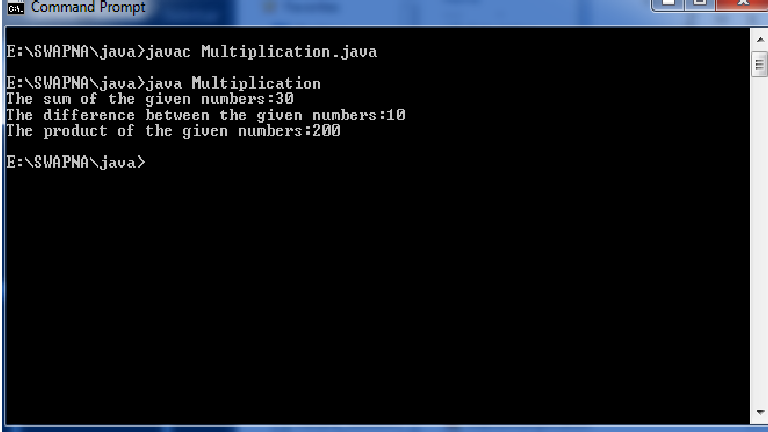
Write a JAVA program that illustrates multi-level inheritance

 Aim: Write a JAVA program that illustrates multi-level inheritance.

Program:

class Add 
{
   int z;
   public void addition(int x, int y) 
   {
      z = x + y;
      System.out.println("The sum of the given numbers:"+z);
   }
}
class Subtract extends Add
{
   public void Subtraction(int x, int y) 
   {
      z = x - y;
      System.out.println("The difference between the given numbers:"+z);
   }
}

public class Multiplication extends Subtract 
{
   public void multiplication(int x, int y) 
   {
      z = x * y;
      System.out.println("The product of the given numbers:"+z);
   }
   public static void main(String args[]) 
   {
      int a = 20, b = 10;
      Multiplication demo = new Multiplication();
      demo.addition(a, b);
      demo.Subtraction(a, b);
      demo.multiplication(a, b);
   }
}

Output:


Labels:

Monday, December 5, 2016

Write a JAVA program to check whether given string is palindrome or not.

Aim: Write a JAVA program to check whether given string is palindrome or not.

Program:


import java.util.*;
 
class Palindrome
{
   public static void main(String args[])
   {
      String original, reverse = "";
      Scanner in = new Scanner(System.in);
 
      System.out.println("Enter a string to check if it is a palindrome");
      original = in.nextLine();
 
      int length = original.length();
 
      for ( int i = length - 1; i >= 0; i-- )
         reverse = reverse + original.charAt(i);
 
      if (original.equals(reverse))
         System.out.println("Entered string is a palindrome.");
      else
         System.out.println("Entered string is not a palindrome.");
 
   }
}

Output:


Labels:

Write a JAVA program to sort an array of strings

Aim:  Write a JAVA program to sort an array of strings.

Program:

import java.util.Scanner;
public class Alphabetical_Order
{
    public static void main(String[] args) 
    {
        int n;
        String temp;
        Scanner s = new Scanner(System.in);
        System.out.print("Enter number of names you want to enter:");
        n = s.nextInt();
        String names[] = new String[n];
        Scanner s1 = new Scanner(System.in);
        System.out.println("Enter all the names:");
        for(int i = 0; i < n; i++)
        {
            names[i] = s1.nextLine();
        }
        for (int i = 0; i < n; i++) 
        {
            for (int j = i + 1; j < n; j++) 
            {
                if (names[i].compareTo(names[j])>0) 
                {
                    temp = names[i];
                    names[i] = names[j];
                    names[j] = temp;
                }
            }
        }
        System.out.print("Names in Sorted Order:");
        for (int i = 0; i < n - 1; i++) 
        {
            System.out.print(names[i] + ",");
        }
        System.out.print(names[n - 1]);
    }
}

Output:


Labels:

Write a JAVA program to determine multiplication of two matrices.

Aim: Write a JAVA program to determine multiplication of two matrices.

Program:

import java.util.Scanner;
 
class MatrixMultiplication
{
   public static void main(String args[])
   {
      int m, n, p, q, sum = 0, c, d, k;
 
      Scanner in = new Scanner(System.in);
      System.out.println("Enter the number of rows and columns of first matrix");
      m = in.nextInt();
      n = in.nextInt();
 
      int first[][] = new int[m][n];
 
      System.out.println("Enter the elements of first matrix");
 
      for ( c = 0 ; c < m ; c++ )
         for ( d = 0 ; d < n ; d++ )
            first[c][d] = in.nextInt();
 
      System.out.println("Enter the number of rows and columns of second matrix");
      p = in.nextInt();
      q = in.nextInt();
 
      if ( n != p )
         System.out.println("Matrices with entered orders can't be multiplied with each other.");
      else
      {
         int second[][] = new int[p][q];
         int multiply[][] = new int[m][q];
 
         System.out.println("Enter the elements of second matrix");
 
         for ( c = 0 ; c < p ; c++ )
            for ( d = 0 ; d < q ; d++ )
               second[c][d] = in.nextInt();
 
         for ( c = 0 ; c < m ; c++ )
         {
            for ( d = 0 ; d < q ; d++ )
            {   
               for ( k = 0 ; k < p ; k++ )
               {
                  sum = sum + first[c][k]*second[k][d];
               }
 
               multiply[c][d] = sum;
               sum = 0;
            }
         }
 
         System.out.println("Product of entered matrices:-");
 
         for ( c = 0 ; c < m ; c++ )
         {
            for ( d = 0 ; d < q ; d++ )
               System.out.print(multiply[c][d]+"\t");
 
            System.out.print("\n");
         }
      }
   }
}

Output:


Labels: